If you’re eager to experience the thrill of Nintendo Switch gaming on your Android device through the Uzuy Emulator, having the right drivers installed is essential for smooth and lag-free gameplay. One of the most important drivers for this purpose is the Mesa3D Turnip Driver.
This driver is specifically designed to optimize GPU performance, ensuring that your games run as smoothly as possible without glitches or performance dips.
The Turnip Driver plays a crucial role in making the most out of your device’s GPU, offering improved graphics rendering, enhanced frame rates, and overall better emulator performance.
In this guide, we’ll walk you through the process of downloading and installing the Mesa3D Turnip Driver for the Uzuy MMJR Emulator, helping you take your gaming experience to the next level on your Android device.
What is Turnip Driver for Switch Emulator?
The Turnip Driver is an open-source, kernel-level graphics driver developed as part of the Mesa3D project. It is specifically designed for Adreno GPUs, which are widely used in Android smartphones and tablets. Its primary role is to implement the Vulkan API, a modern graphics interface that provides high performance and efficiency for demanding applications like gaming and emulation.
From a practical standpoint, the Turnip Driver serves as a bridge between your Android device’s GPU hardware and software applications such as emulators. Popular Nintendo Switch emulators like Suyu and Yuzu, as well as the Vita3K (PS Vita) emulator, rely heavily on Turnip for smooth rendering and stable performance.
Why Turnip Driver Important for Uzuy Emulator?
The Turnip Driver is crucial for ensuring the smooth and efficient operation of the Uzuy Emulator on your Android device. Without it, you might face performance issues such as lag or stuttering, which can negatively impact your gaming experience.
This driver enables the emulator to recognize and fully support Nintendo Switch games, allowing the emulator to properly communicate with your device’s GPU and hardware. It significantly boosts performance optimization, improving graphics rendering and gameplay smoothness.
Once installed, the Turnip Driver ensures seamless gameplay, eliminating frustrating interruptions like lag and providing a more enjoyable experience while running Switch titles on the Uzuy Emulator.
Why is the Turnip Driver a Must-Have?
If you’re serious about Nintendo Switch or PS Vita emulation on Android, the Turnip Driver isn’t optional—it’s essential. Here’s why it makes such a difference:
- Performance Boost – By optimizing how your Adreno GPU communicates with the emulator, Turnip significantly reduces lag, stuttering, and frame drops. The result? Higher frame rates and smoother gameplay.
- Enhanced Compatibility – Many Nintendo Switch titles are built around the Vulkan API, and Turnip provides accurate Vulkan support. This means a wider library of games can run properly on Android devices without rendering issues.
- Greater Stability – Stock GPU drivers often struggle with demanding emulation. Turnip minimizes random crashes, freezes, and visual glitches, so you can focus on playing instead of troubleshooting.
- Better Efficiency – By handling graphics calls more effectively, Turnip can even help conserve battery life during longer gaming sessions.
- Better Compatibility – Ensures that a wide variety of Nintendo Switch and PlayStation Vita titles can run on Android devices.
- Optimized Performance – Allows the emulator to make full use of the GPU’s power, leading to higher frame rates and smoother graphics.
Download Turnip Drivers Latest Version 2025
| Mesa Turnip Driver v24.0.0 – R18 | GitHub |
| Mesa Turnip Driver v24.0.0 – R17 | GitHub |
| Mesa Turnip Driver v24.0.0 – R16 | GitHub |
| Mesa Turnip Driver v24.0.0 – R15 | GitHub |
| Mesa Turnip Driver v24.0.0 – R14 | GitHub |
| Mesa Turnip Driver v24.0.0 – R13 | GitHub |
| Mesa Turnip Driver v24.0.0 – R12 | GitHub |
| Mesa Turnip Driver v24.0.0 + A7xx basic support – R13 | Mediafire |
| Mesa Turnip Driver v24.0.0 + A7xx basic support – R12 | Mediafire |
| Mesa Turnip Driver v24.0.0 – R11 | Mediafire |
| Mesa Turnip Driver v24.0.0 + A7xx basic support | Mediafire |
| Mesa Turnip Driver – v23.3.0-dev, Vulkan 1.3.258 | MediaFire |
| Mesa Turnip Driver – v23.3.0-dev, Vulkan 1.3.255 + a7xx basic support | MediaFire |
| Mesa Turnip Driver v23.2.0 + a7xx basic support v2 FIX2 | MediaFire |
| Turnip Vulkan Driver v23.2.0 + a7xx basic support | MediaFire |
| Mesa Turnip Driver – v23.3.0-dev, Vulkan 1.3.261 | MediaFire |
| Mesa Turnip Driver v23.2.0 + A7xx basic support – R5 | MediaFire |
| Mesa Turnip Driver v23.2.0 + A7xx basic support – R4 | MediaFire |
| Mesa Turnip Driver v23.2.0 + A7xx basic support – R3 | MediaFire |
| Freedreno Turnip Vulkan Driver v23.2.0 – (5/5/23) – FIXED | MediaFire |
| Mesa3D Turnip Driver v23.1.0-dev | MediaFire |
| Mesa3D Turnip Driver v23.0.3 | MediaFire |
| Turnip-v22.3.6-r1 | MediaFire |
| Turnip-v22.3.5-r2 | MediaFire |
| Turnip-v22.3.5-r1 | MediaFire |
| Turnip-v22.3.4-r2 | MediaFire |
| Turnip-v22.3.4-r1 | MediaFire |
| Turnip v22.3.3-r2 – ft.lybxlpsv | MediaFire |
| Turnip v22.3.3-R1 | MediaFire |
| Turnip v22.3.2-R2.zip | MediaFire |
| Turnip v22.3.2-R1 | MediaFire |
| Turnip-v22.3.1-R2 | MediaFire |
| Turnip Driver v25 | MediaFire |
| Turnip Driver v24 | MediaFire |
| Turnip Driver v12 | MediaFire |
| Turnip-KGSL Rework | MediaFire |
| Turnip driver by Mark v2 | MediaFire |
| Turnip driver by Mark v1 | MediaFire |
| Turnip Driver v26 | MediaFire |
| Turnip Driver v22.3.1-r2 | MediaFire |
How to Install Turnip Drivers on Uzuy Emulator?
Installing Mesa Turnip drivers on the Uzuy Emulator is quick and straightforward. Whether you’re a beginner or just want to ensure you’re doing it correctly, follow the simple guide below to get your drivers up and running.
1. Download the Mesa Turnip Driver
Start by downloading the Mesa Turnip driver from the provided links above. Ensure it’s compatible with your Android device and operating system for smooth installation.
2. Launch the Uzuy Emulator
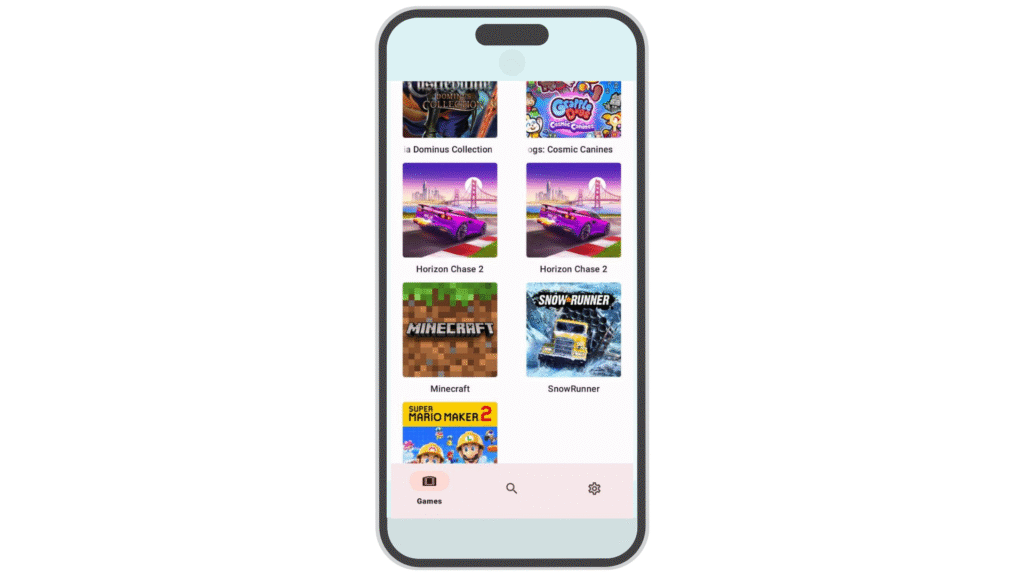
Open the Uzuy Emulator on your Android device. Once it’s up and running, tap the gear icon in the top-left corner to open the Settings menu.
3. Access the GPU Driver Manager
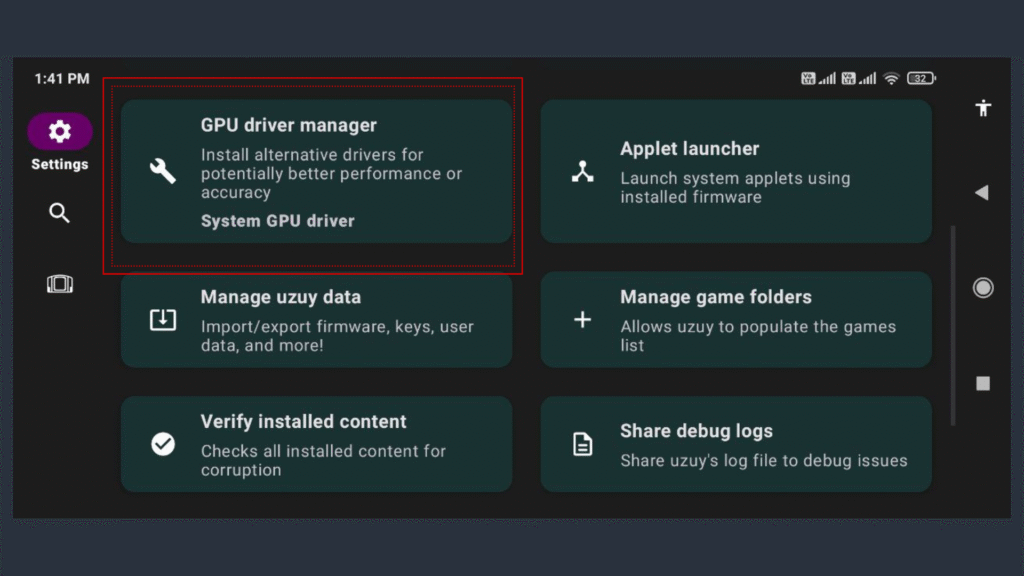
In the Settings menu, locate and tap “GPU Driver Manager.” This is the section where you can manage, install, and update GPU drivers in the emulator.
4. Install the Driver
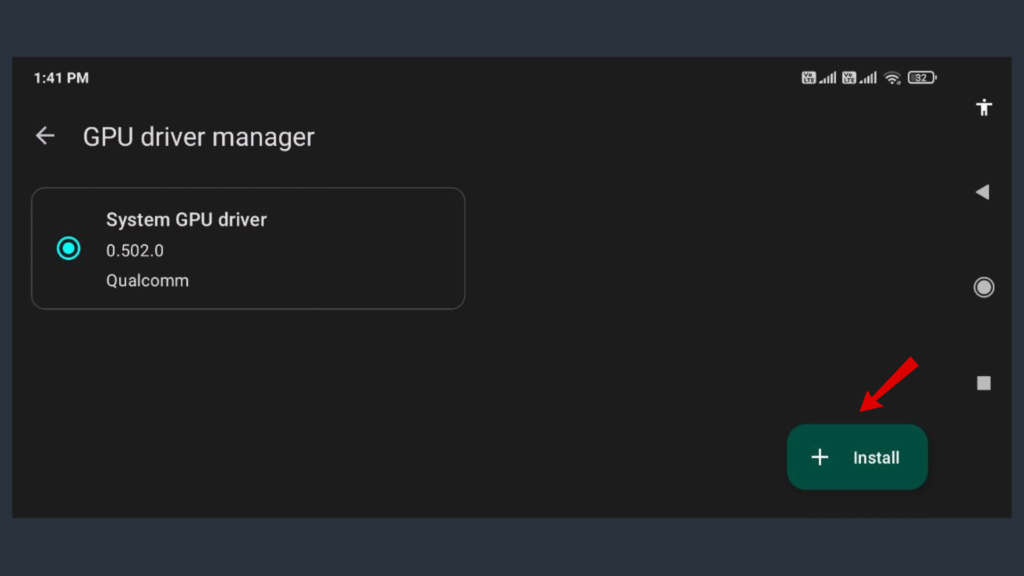
Tap the “Install” button in the GPU Driver Manager to begin the installation process. A file browser will pop up.
5. Select the Turnip Driver File
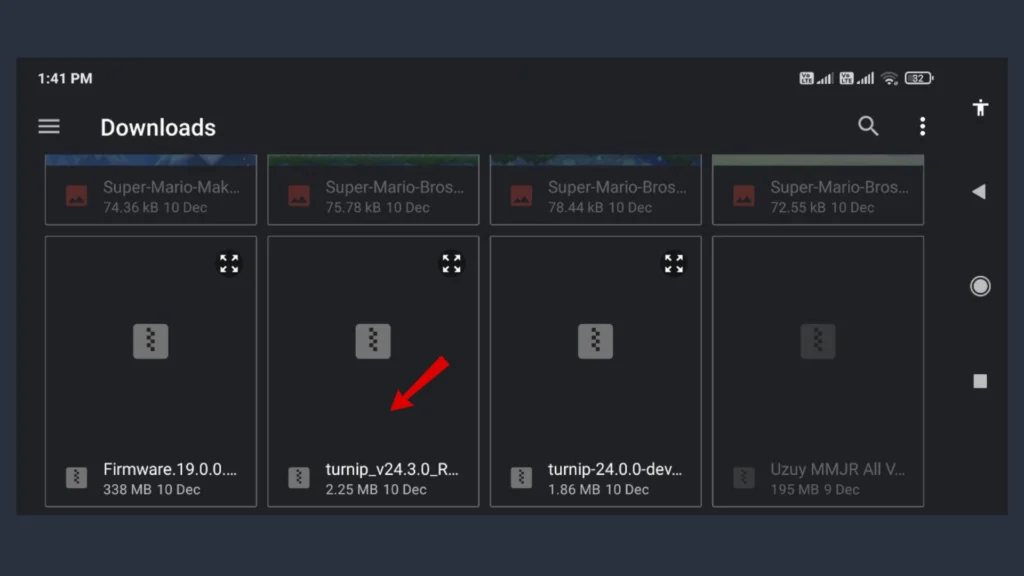
Use the file browser to navigate to the location where you saved the Mesa Turnip driver file. Select the file to initiate the installation.
6. Let Uzuy Emulator Handle the Installation
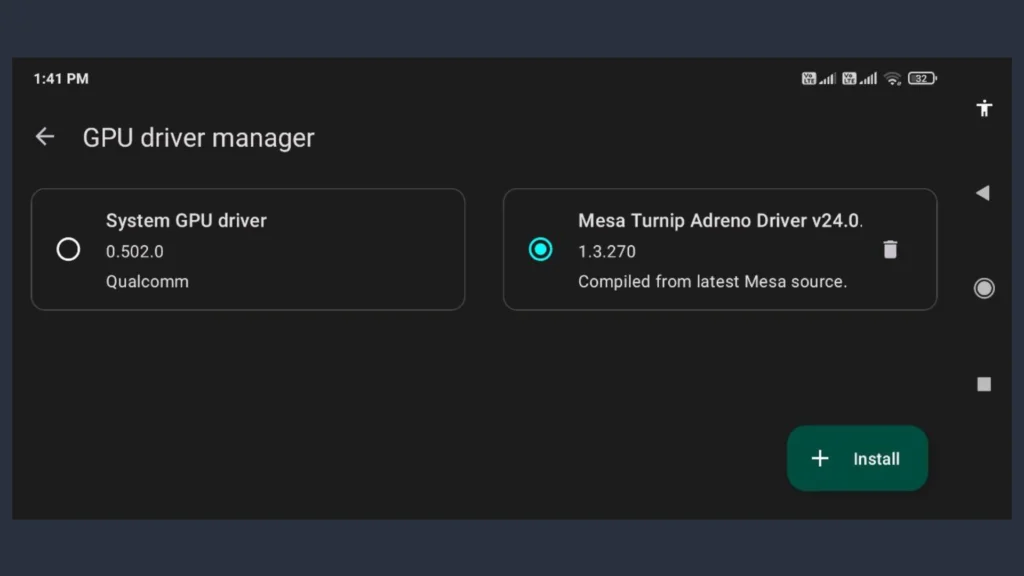
After selecting the driver file, the Uzuy Emulator will handle the installation automatically. You’ll receive a notification once the Mesa Turnip GPU driver has been successfully installed.
By following these simple steps, you’ll ensure the Mesa Turnip drivers are properly installed, giving you enhanced performance and compatibility for a superior gaming experience on the Uzuy Emulator.
(FAQs) Frequently Asked Questions
Q:1 What GPU is supported by Turnip driver?
The Turnip driver supports Qualcomm Adreno GPUs, primarily those found in Snapdragon SoCs. Officially, it focuses on Adreno 600 series (e.g., Adreno 640, 650, 660, 730, 740) and newer, offering Vulkan API support for gaming and graphics. Some Adreno 500 series GPUs are partially supported, but performance and stability vary.
Q:2 What is the Mesa Turnip driver for Uzuy Emulator?
The Mesa Turnip driver is a specialized GPU driver for Android devices, designed to improve performance when using emulators like Uzuy to play Nintendo Switch games. It optimizes graphics rendering and ensures smooth gameplay.
Q:3 How do I install Mesa Turnip drivers on Uzuy Emulator?
To install the Mesa Turnip driver on Uzuy Emulator, download the driver, access the GPU Driver Manager in the emulator’s settings, and follow the prompts to install the driver on your Android device.
Q:4 Can Mesa Turnip drivers improve gameplay performance?
Yes, the Mesa Turnip driver significantly improves the graphics rendering and overall performance of Nintendo Switch games on the Uzuy Emulator, reducing lag and ensuring smoother gameplay.
Q:5 Mesa Turnip driver compatible with all Android devices?
The Mesa Turnip driver is compatible with Adreno GPUs, Snapdragon processors, and other compatible hardware. Ensure your device meets the requirements before installing.
Q:6 How do I check my Android device’s GPU compatibility for the Mesa Turnip driver?
To check your device’s GPU compatibility, use tools like CPU-Z or AIDA64, which can identify your device’s GPU model and help determine if it’s compatible with the Mesa Turnip driver.
Q: 7 How to download Mesa Turnip driver?
You can download the latest version of the Mesa Turnip driver directly from our website: https://uzuymmjr.net/. We provide up-to-date builds so you don’t need to compile Mesa manually or search through multiple sources. Simply visit the link, choose the most recent release, and follow the included installation instructions for your device or operating system. This ensures you always get the newest features, bug fixes, and performance improvements for Qualcomm Adreno GPUs.